

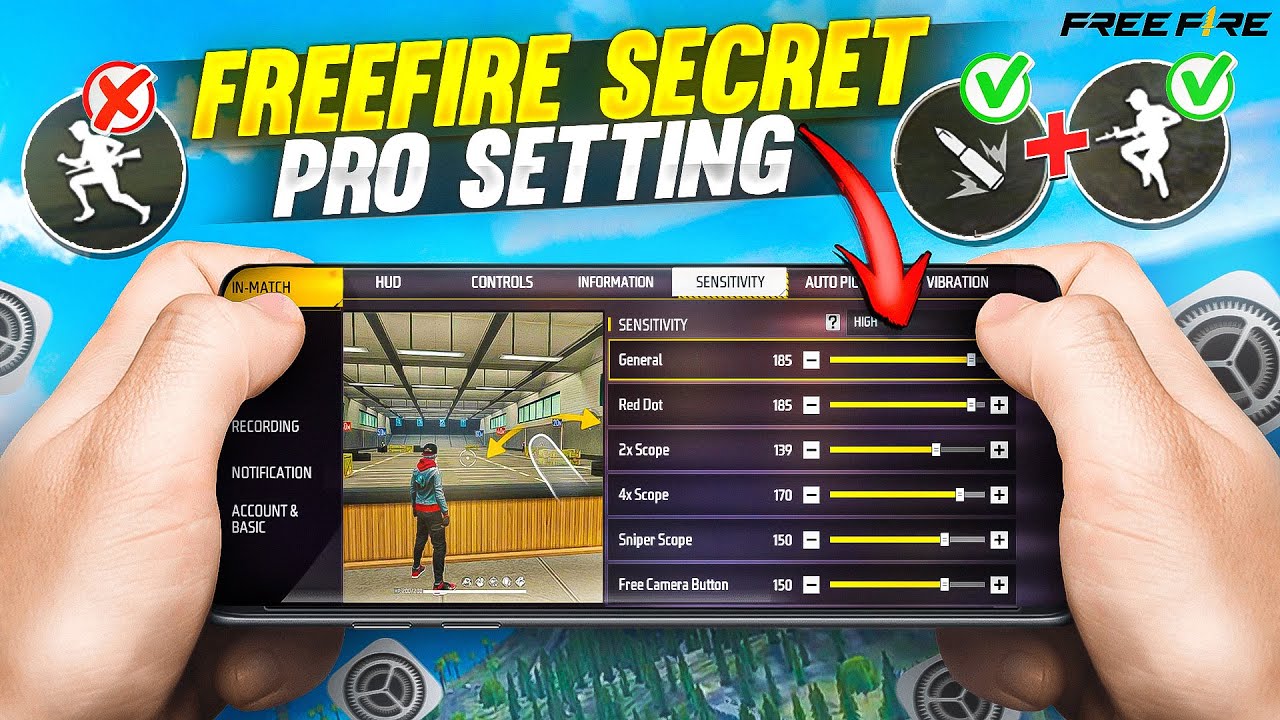
Free Fire headshot settings play a crucial role in improving a player’s accuracy, reaction speed, and overall gameplay performance. In a fast-paced battle royale environment like Free Fire, even a split-second delay or slight aim error can decide victory or defeat. That is why optimizing sensitivity, control layout, and aim precision is essential for players who want to consistently land headshots and dominate matches.
A well-configured headshot setting helps players maintain better crosshair control, especially during close and mid-range fights. Adjusting settings such as general sensitivity, red dot sensitivity, scope sensitivity, and aim precision allows smoother tracking of enemy movements and faster target locking.
Importance of Headshot Optimization
Improved headshot settings offer multiple advantages in gameplay:
- Faster target locking
- Improved recoil control
- Higher damage output
- Better close range performance
- Increased win rate in ranked matches
- Enhanced movement and shooting balance
Players without optimized settings often struggle with unstable aim and missed shots. Proper configuration ensures smoother gameplay and consistent results.
Best Sensitivity Settings for Headshot Accuracy
Sensitivity plays most important role in Free Fire headshot performance. It controls how quickly screen reacts to finger movement.
General Sensitivity
General sensitivity affects overall screen movement. High sensitivity allows fast turning and quick reaction during fights.
Recommended range:
- 90 to 100 for aggressive players
- 85 to 95 for balanced gameplay
Red Dot Sensitivity
Red dot sensitivity helps in close range fights and SMG control.
Recommended range:
- 88 to 98 for stable head tracking
2x Scope Sensitivity
Used for mid range combat and AR weapons.
Recommended range:
- 75 to 90
4x Scope Sensitivity
Improves control for long range aiming.
Recommended range:
- 70 to 85
AWM Scope Sensitivity
Used for sniper accuracy and long distance headshots.
Recommended range:
- 50 to 70
Free Look Sensitivity
Controls camera movement without aiming.
Recommended range:
- 75 to 90
Proper sensitivity balance improves smooth aim transition and reduces recoil impact.
Aim Precision Settings for Better Headshots
Aim precision controls how crosshair behaves when targeting enemies. It affects bullet landing position and accuracy.
Common options:
- Default
- Precise on Scope
- Full Control
Recommended Choice
“Precise on Scope” provides best balance for headshot improvement. It helps auto adjustment during scoped shooting and improves target alignment.
HUD Layout Optimization
HUD layout defines the placement of buttons on the screen. Professional players customize layout for faster reaction time.
Important Adjustments
- Fire button size increase for easy tapping
- Drag headshot control near thumb area
- Jump and crouch buttons are placed for quick access
- Scope button near fire button for instant aim
Pro Layout Tips
- Keep the fire button on the right side
- Maintain spacing for thumb movement
- Avoid a cluttered layout
- Use claw style if possible
A good HUD layout reduces the delay between aim and fire action.
Read Also: Free Fire Diamond Giveaway Ideas and Strategies for Maximum Engagement
Best Device Settings for Smooth Gameplay
Device performance directly impacts headshot accuracy. Low FPS or lag reduces aim stability.
Recommended Device Settings
- Enable high FPS mode
- Turn off background apps
- Use game booster if available
- Set graphics to smooth mode
- Disable unnecessary visual effects
Stable frame rate ensures better recoil control and faster reaction time.
Recoil Control Techniques
Even with perfect settings recoil control is essential for consistent headshots.
Basic Techniques
- Drag fire button slightly downward
- Maintain steady finger movement
- Avoid over swiping screen
- Practice burst firing instead of continuous spray
Advanced Control
- Combine movement with shooting
- Use crouch during fire for stability
- Adjust aim while tracking enemy head level
Mastering recoil improves accuracy in all weapon types.
Weapon Selection for Headshots
Some weapons are more suitable for headshot gameplay.
Best AR Weapons
- AK47
- M4A1
- SCAR
Best SMG Weapons
- MP40
- UMP
Best Sniper Weapons
- AWM
- Kar98k
Each weapon requires slight sensitivity adjustment for best performance.
Training Methods to Improve Accuracy
Practice is essential for mastering Free Fire headshot settings.
Training Mode Practice
- Aim at moving targets
- Practice flick shots
- Control recoil with different guns
- Test sensitivity changes
Custom Room Practice
- Play with friends or bots
- Focus on head level aiming
- Practice close range fights
Daily training improves muscle memory and reaction speed.
Advanced Pro Player Tips
Professional players use advanced techniques to maximize headshot rate.
Movement-Based Shooting
- Strafe left and right while firing
- Combine jump with aim tracking
Head Level Targeting
Always keep crosshair at enemy head level before fight begins.
Pre Aim Strategy
Aim at common enemy positions before they appear.
Sound Awareness
Use footsteps to predict enemy direction and prepare aim.
Common Mistakes to Avoid
Many players fail due to simple mistakes:
- Using too high a sensitivity without control
- Ignoring HUD layout customization
- Poor device optimization
- Lack of practice routine
- Over-spraying without recoil control
Avoiding these mistakes improves gameplay consistency.
Final Optimization Strategy
To achieve the best results, combine all elements:
- Balanced sensitivity setup
- Clean HUD layout
- Stable device performance
- Daily training practice
- Controlled recoil technique
Consistency matters more than random adjustments. Small improvements in each area lead to high-level gameplay performance.
Frequently Asked Questions
What is the best aim precision setting for headshots?
“Precise on Scope” is the best aim precision option as it helps improve accuracy while scoped and supports better headshot alignment.
Does HUD layout affect headshot performance?
Yes, HUD layout is very important. Proper button placement reduces reaction time and helps players fire faster and aim more accurately.
Can low-end devices affect headshot accuracy?
Yes, lag and low FPS can reduce aiming stability. Using smooth graphics and closing background apps helps improve performance.
Which weapon is best for headshots in Free Fire?
AK-47, M4A1, MP40, and AWM are considered strong weapons for headshots due to high damage and stable recoil control.
How important is practice for improving headshots?
Practice is very important. Regular training improves muscle memory, recoil control, and reaction speed, which directly increases headshot success rate.
Why do I miss headshots even with good settings?
Missing headshots usually happen due to poor recoil control, incorrect aim placement, or lack of practice, rather than settings alone.
Can pro players settings work for everyone?
Pro player settings are a good reference but every player should adjust sensitivity and HUD based on their device and personal comfort for best results.
Conclusion
Free Fire headshot settings play a critical role in improving accuracy and overall gameplay performance. Proper sensitivity tuning, HUD optimization device settings, and consistent practice create a powerful combination for winning more matches. Players who understand and apply these settings gain stronger control, faster reaction, and higher headshot rate in every battle.
Mastering these techniques transforms average gameplay into professional-level performance and ensures long-term success in the Free Fire competitive environment.
